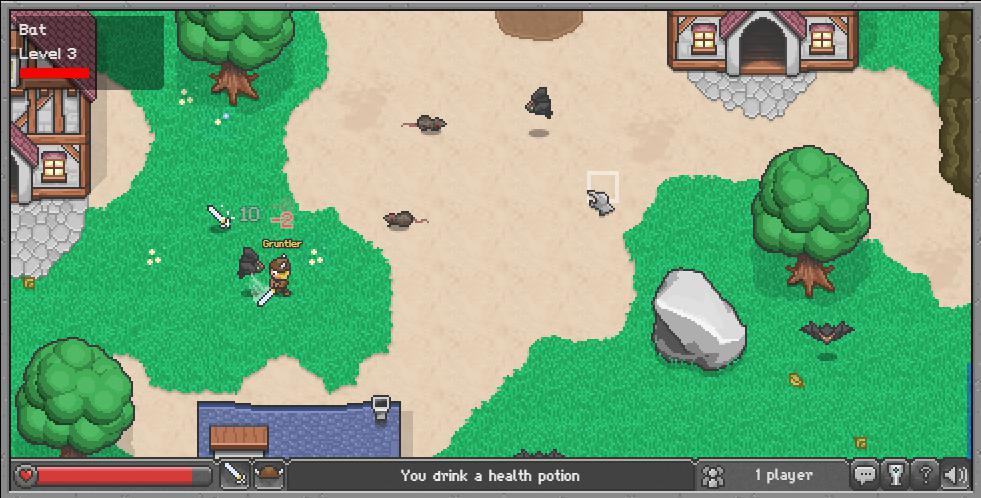
BrowserQuest · RAWG · Courtesy of RAWG
Game data
- Released
- 2012-03-27
- User rating
- 3.00 / 5
- Genres
- Massively Multiplayer, RPG
- Platforms
- PC, Web
via RAWG
Game details · IGDB
BrowserQuest is a multiplayer game inviting you to explore a world of adventure from your Web browser.
- Released
- 2012
- Genres
- Role-playing (RPG)
- Platforms
- Web browser, Android, PC (Microsoft Windows)
- Game modes
- Single player, Massively Multiplayer Online (MMO)
- Publisher
- Raster Games
Source code
Firefox - Works well. Chrome - Works well. Chromium - Works well. Opera 15.x - Works well. Opera 12.16 - Background music doesn't play. Everything else works (Very slow though). Safari 6.x - Background music doesn't play. Everything else works well. IE 10.x - Doesn't work. Other versions untested. Getting the server up and running is pretty easy. You need to have the following installed: Before starting the BrowserQuest server, you must start Redis. In Windows, you can simply run redis-server.exe in your redis bin release directory. That means its working. There should not be any warnings or errors. Using a browser, connect to port 8000 of the server entered above. The BrowserQuest start page should appear, and the game should work. On Fedora 16+ and RHEL/CentOS/SL 6.x, you can install Redis (required) and Memcached (optional) using yum. For just RHEL/CentOS/SL 6.x, you need to add the EPEL repo first. Not needed for Fedora: Windows 8 is known to work ok with just the base Node v0.8.18 installed, without Visual Studio, nor Python, nor the native extensions for npm modules installed. Instructions for OpenShift 1. Follow the instructions to get started with the OpenShift client tools here. 3. Add the Redis cartridge (necessary for BrowserQuest to be able to store data) with the following command: 4. Add the BrowserQuest repository, and pull its contents with the following commands: 7. Add this file to your repository by running the following commands: $ git add server/config local.json $ git commit -m "Added config local.json" 8. Now, deploy to OpenShift with one final command (this will take several minutes): Congratulations! You have now deployed BrowserQuest to Openshift! You can see the url of your instance by running Visit the url shown by the above command to see BrowserQuest running. You will need to add ":8000" to the end. Use the url below as a guide: Where [NAME] is an optional name for your application (Heroku will automatically create one otherwise). Where [REDIS HOST], [REDIS PORT], and [REDIS PASSOWRD] are your Redis hostname, port, and password, respectively. If you Redis instance is configued without a password, omit the last command. 6. Enable the Heroku WebSockets lab (needed for communication between the browser and the BrowserQuest server) with the following command: The old mailing list on librelist.com is no longer used. Its archives are online here. Code is licensed under MPL 2.0. Content is licensed under CC-BY-SA 3.0. See the LICENSE file for details.
Excerpt from the source-code README · 12,093 chars · not written by Vinony
Wikidata facts
- Instance of
- free software
- Publisher
- Mozilla Foundation
- Developer
- Mozilla Foundation
- Platform
- web browser
- Game mode
- multiplayer video game
- Official website
- browserquest.herokuapp.com
Show 6 more facts
- uses
- WebSocket
- programmed in
- JavaScript
- source code repository URL
- github.com/browserquest/BrowserQuest
- software quality assurance
- continuous integration
- software version identifier
- 1.4.0
- Commons category
- BrowserQuest
via Wikidata · CC0
Article · 中文
《BrowserQuest》是由Mozilla公司與法國网页设计工作室Little Workshop合作开发的免费MMORPG,用於展示最新的網路技術。遊戲基于Canvas、HTML5、JavaScript和WebSocket技术打造;而音效则由HTML5的音效标签负责,游戏原始碼發布於GitHub网站。游戏通过HTML5的Canvas元素构建了复古的2D像素化视觉效果,而音效则由HTML5的音频标签负责。而最新标准提供的支持使玩家不需要额外的扩展即可开始游戏,并可以在台式电脑、平板电脑及智能手机等任何支持HTML5的平台运行。游戏通过WebSocket连接服务器,并用本地储存保存玩家的游戏进度,游戏很好的应对了初始负载,在1,900个玩家同时在线时游戏也能正常运行。游戏源代码在GitHub网站上发布。這款遊戲的意義在於,不需要任何外掛程式或安裝即可遊戲,可說是未來網頁遊戲的雛形。
Abstract from DBpedia / Wikipedia · CC BY-SA